

Description
Download Aeon Card Mobile Merchant APK – Mobile Payment Tool, Android App, Merchant Solution
Overview
Aeon Card Mobile Merchant is a mobile application designed for merchants in Cambodia, developed by AEON Specialized Bank Cambodia Plc. The software enables businesses to accept card payments directly from their Android smartphones or tablets, eliminating the need for traditional point-of-sale terminals. By leveraging mobile technology, the app streamlines the payment process, offering a faster and more secure alternative to cash or manual transaction methods.
Target users include small to medium-sized business owners, retail vendors, food service providers, and independent sellers who require a portable and reliable payment solution. The app supports real-time transaction processing, allowing merchants to record payments instantly and maintain accurate sales records. It is particularly useful in environments where mobility and quick transaction handling are essential, such as street vendors, pop-up shops, or delivery services.
Merchants must be enrolled in the AEON Card Mobile network to use the app, ensuring a controlled and secure ecosystem. The application facilitates immediate access to transaction history, sales journal integration, and outlet management, promoting efficient financial tracking. While the developer did not provide additional system requirements, the app is designed to function on standard Android devices compatible with the latest OS versions.
Key Features & Capabilities
- Mobile Payment Processing – Accept card payments directly from customers using a mobile device, enabling flexible and on-the-go transactions.
- Instant Sales Journal Integration – Transactions are automatically recorded in the merchant’s sales journal, reducing manual data entry and minimizing errors.
- Transaction History Access – View a detailed record of all completed payments, including date, amount, and transaction ID for audit and reconciliation purposes.
- Outlet Management – Manage multiple business locations or sales points from a single account, ideal for multi-location merchants.
- Secure Payment Environment – Designed with security protocols to protect sensitive payment data during transmission and storage.
Merchants can use the app to process payments for any product or service eligible for card payment, making it suitable for diverse business types. The app supports real-time confirmation of payments, ensuring that funds are verified immediately upon completion. This functionality enhances trust and efficiency in customer interactions. The integration with the AEON Card Mobile network ensures compliance with regional payment standards and facilitates seamless reconciliation with the bank.
User Interface, Workflow & Performance
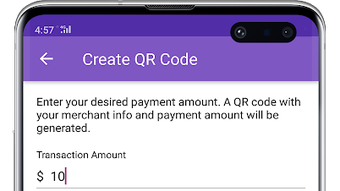
The user interface of Aeon Card Mobile Merchant is designed for simplicity and ease of use, with intuitive navigation tailored to business owners who may not have technical expertise. Key functions such as initiating a payment, viewing transaction history, and managing outlets are accessible through clearly labeled menus and icons. The workflow is streamlined, allowing merchants to complete a transaction in just a few taps.
Navigation is consistent across screens, minimizing the learning curve. The app maintains a clean layout with minimal clutter, focusing on essential actions. While the developer did not specify resource usage details, the application is expected to operate efficiently on standard Android devices with modern processing capabilities. Performance observations are based on general software behavior patterns, indicating stable operation during typical usage scenarios.
Stability appears to be a priority, as the app supports continuous transaction processing without reported interruptions. The design emphasizes reliability, which is critical for business operations. The app does not require constant internet connectivity for all functions, but real-time processing depends on a stable connection. Offline functionality, if available, was not specified.
Compatibility & System Requirements
Aeon Card Mobile Merchant is designed for Android operating systems. The app is available as an APK file, allowing installation on Android devices that support sideloading. Specific version requirements were not provided, but the app is intended for use on devices running current Android OS versions.
Installation size and hardware requirements were not disclosed by the developer. The exact system requirements were not listed, so users should ensure their device meets general Android standards for running third-party applications. Compatibility information was partially provided, and the app may not be compatible with older or non-standard Android devices.
Merchants must be enrolled in the AEON Card Mobile network to access the app’s full functionality. This requirement ensures that only authorized users can utilize the payment system, enhancing security and compliance.
Pros and Cons
Pros
- Enables mobile card payments without physical POS terminals
- Offers real-time transaction recording and journal integration
- Secure and compliant with regional payment standards
- Supports multiple outlets and business locations
- Free to download and use for eligible merchants
Cons
- Requires enrollment in the AEON Card Mobile network
- Only available for Android devices
- Installation via APK may raise security concerns for some users
- Exact system requirements not publicly available
- Not available for iOS or other platforms
FAQ Section
Is Aeon Card Mobile Merchant available for iOS devices?
The app is currently only available for Android devices. No iOS version has been released or announced.
How do I get started with the app?
To get started, you must be a merchant enrolled in the AEON Card Mobile network. Download the APK file from the official website of AEON Specialized Bank Cambodia Plc. or contact the bank for assistance.
Is the app safe to use?
The application is developed by AEON Specialized Bank Cambodia Plc. and designed with security protocols to protect payment data. However, users should only download the APK from official sources to avoid risks associated with third-party versions.
Do I need an internet connection to use the app?
Internet connectivity is required to process payments and sync transaction data. Offline functionality, if any, was not specified by the developer.
Can I use the app to manage multiple business locations?
Yes, the app includes outlet management features, allowing merchants to oversee multiple sales points from a single account.
Final Thoughts + CTA
Aeon Card Mobile Merchant offers a practical, secure, and efficient solution for Cambodian merchants seeking to modernize their payment processes. By eliminating the need for bulky POS hardware, the app brings payment acceptance directly to the merchant’s mobile device. Its integration with the AEON Card Mobile network ensures reliability and compliance, while features like real-time journal updates and transaction history provide valuable financial oversight.
While the app is limited to Android and requires network enrollment, its benefits for small businesses and mobile vendors are significant. The free availability and focus on usability make it a strong choice for merchants in Cambodia looking to accept card payments with ease.
Download Aeon Card Mobile Merchant now to transform your payment workflow and grow your business with confidence.
Guides & Tutorials for Aeon Card Mobile Merchant APK
How to install Aeon Card Mobile Merchant APK
- Click the Preview / Download button above.
- Once redirected, accept the terms and click Install.
- Wait for the Aeon Card Mobile Merchant APK download to finish on your device.
How to use Aeon Card Mobile Merchant APK
This software is primarily used for its core features described above. Open the app after installation to explore its capabilities.
User Reviews for Aeon Card Mobile Merchant APK 0
No reviews found





